Raksha
Hiring a freelancer shouldn’t mean trawling through hundreds of cold portfolios, sending endless DMs, or posting into the void and hoping for the best. Twine is built differently.
Rather than cold-searching through portfolios, you write a brief and Twine matches it to relevant freelancers, notifying people based on their skills, experience, location, and the kind of work they do.
Freelancers can then pitch directly to your project. Pitches are reviewed before they reach you, so your inbox stays focused. You can also take a more active approach. Once your job is live, Twine shows you a list of freelancers matched to your brief that you can browse and invite directly.
Posting typically takes two to five minutes. This guide covers each step, what to fill in, how to write a clear brief, and what to expect once your job is live.
💡 Why brief quality matters
Twine’s data shows that well-structured job posts receive significantly more qualified pitches. A clear title, specific deliverables and a defined budget filter out mismatches before they reach your dashboard, saving you hours of back and forth.
Before You Start: What to Gather
You can fill out the brief on the fly, but a little preparation goes a long way. Spend five minutes pulling together the following before you hit “Post a Job”:
Role or service | Drives Twine’s matching algorithm. Vague roles like ‘designer’ return broad results. ‘Brand designer for SaaS rebrand’ is far more useful. |
Project deliverables | What does success look like? A shipped feature, a finished logo, a 2-minute promo video? Concrete outputs help freelancers self-qualify. |
Budget range | Even a ballpark figure helps. Freelancers who aren’t aligned on budget won’t pitch, which saves everyone’s time. |
Timeline & milestones | When is this needed? Are there hard launch dates, board demos, or campaign deadlines? Non-negotiable dates should be stated upfront. |
Location needs | Do you need someone on-site, in a specific time zone, or within a particular country? Twine lets you configure all of this. |
Reference material | Moodboards, brand guidelines, example work, competitor references. Anything that communicates your taste speeds up alignment. |
Have this ready and the posting process becomes a simple form-fill rather than a creative writing exercise under pressure.
Step-by-Step: How to Post a Job on Twine
1. Go to the “Post a Job” Page
Head to Twine’s Post a Job page (you can access it directly or via the main site navigation).
From here, you’re about to create a job description or project spec that Twine will use to match you with suitable freelancers. This is the core of how the platform works.
No account? No problem. You’ll create one as part of the posting flow using your email address.
2. Enter the Role or Type of Work You Need
The first question is simple: what kind of freelancer are you looking for, or what type of content do you need created? This input seeds Twine’s matching and determines which community members are notified.
Good examples:
– Logo designer for a fintech startup
– 2D animator for an explainer video series
– React developer for a SaaS analytics dashboard
– Voiceover artist for a documentary short
– Copywriter for a Series A product launch
The more specific you are, the more targeted the notifications Twine sends. Not sure what to call the role? Browse Twine’s services page to see common categories and offerings freelancers provide.
Why this matters:
The role you choose influences who Twine alerts and how your job is categorised, so be specific. “Designer” is vague. “Brand designer for SaaS rebrand” is much more precise.
3. Complete the Project Questionnaire
Next, Twine will ask a series of questions about your job or project. The more accurate you are, the better the platform can match you with relevant people.
You’ll typically cover areas like:
3.1 Job Title
Your job title is the first thing a freelancer reads. A weak title loses them immediately. A strong one makes them click. Use this proven formula:
A simple formula that works:
[Seniority] [Role] to [Outcome] for [Context/Industry]
Strong examples:
– Senior UX Designer to Redesign B2B Analytics Dashboard (SaaS)
– Motion Designer to Create Launch Trailer for Mobile Game
– Full-Stack Developer to Build MVP for HealthTech App
– Mid-Level Brand Designer to Refresh Identity for D2C Beauty Brand
Weak examples:
– UX person needed
– Designer for project
– Developer wanted ASAP
This helps freelancers self-select quickly: they know if they’re at the right level, in the right niche and interested in your type of work.
3.2 Writing a Compelling Project Description
The more exciting your project description is, the more people will contact you.
You don’t need marketing copy, you need clarity and enough detail that a freelancer can picture the work and their role in it. Structure it like this:
- One-line overview
What you do, where you’re based, and what this project is in one sentence.
Example: “We’re a London-based SaaS startup refreshing our visual identity ahead of a Series A announcement.” - Concrete deliverables
Don’t be vague. List exactly what you need: three logo variations, a website hero image, five social media templates, an app icon set, etc. Freelancers scope their time and price from this list. - Who you’re targeting
Who is this for? Naming your audience (B2B enterprise buyers, Gen Z gamers, first-time parents, healthcare professionals) helps freelancers tailor their pitch and portfolio examples. - Style and references
Describe the aesthetic: “modern, minimal, bold typography, think Notion meets Linear.” Add links to reference work or moodboards where you can. - Technical requirements
Specify tools (Figma, After Effects, Webflow), file formats, platforms (iOS, Android, WebGL), or any constraints the freelancer must work within. - Collaboration details
Who will they work with day to day? How will you communicate (Slack, email, Notion)? How frequently do you expect check-ins?
💡Pro tip:
When you’ve finished your description, read it as if you were a freelancer seeing it for the first time. Can you clearly picture what you’d be making, who it’s for, and what tools you’d use? If not, add more detail.
3.3 Scope, Experience Level, Budget & Timeline
Scope:
Be explicit about what is and isn’t included. A clear scope statement protects both sides.
– In scope: animation, sound design, basic storyboards, three revision rounds
– Out of scope: scriptwriting, voiceover casting, custom music composition
Experience Level
Match the tier to your project’s complexity and budget:
– Beginner: Learning the craft. Good for simple, low-stakes projects with room for guidance.
– Junior: 1–2 years of experience. Solid for well-defined tasks with clear direction.
– Mid-level: 3–5 years. Capable of owning a project end-to-end with minimal supervision.
– Senior: 5–8 years. Brings strategic thinking as well as execution.
– Expert: 8+ years or recognised specialist. For technically demanding or brand-critical work.
Budget
You’ll indicate a budget or range so freelancers can decide if they’re a fit. Don’t obsess over perfection, clarity beats precision. If you genuinely have flexibility, say so in the brief (e.g. “We can stretch for the right experience”).
Timeline
Include both the overall project duration and any fixed milestones:
– How long do you expect the project to run?
– Are there hard deadlines, a product launch, a funding announcement, a campaign go-live?
– When do you need the first deliverable or draft?
Transparent constraints will attract professionals who can realistically deliver what you need.
3.4 Setting Location and Remote Preferences
- On-site: Required for in-person work: filming, photography, workshops, or roles that need physical presence. Enter the nearest city.
- Hybrid: Mostly remote but occasional in-person contact. Good for longer engagements where periodic face time matters.
- Remote within country: Hire remotely, but from within your own country, ideal for legal, currency, or time zone reasons.
- Full remote: Global talent pool, entirely remote. The widest reach for most roles.
If your work is time-sensitive, note the time zone you need to overlap with. “We operate CET business hours” saves everyone from a scheduling mismatch.
4. Add Your Email and Create Your Client Account
As part of the posting, Twine will ask for your email to create your client account. This is how you’ll access your project dashboard, receive notifications, and manage applications.
Best practices:
- Use a work email. It signals legitimacy, especially if you’re hiring on behalf of a company.
- Add your company name and a short description. Freelancers research clients before pitching; a credible profile gets more and better responses.
- Include a website link if you have one. It builds trust and helps freelancers understand your brand context.
5. Submit Your Job for Review
Once you submit, Twine’s team reviews your job post before it goes live. This helps ensure only clear, legitimate briefs reach the freelancer community.
While your post is under review, you can log in using the email address that you provided. Head to your dashboard, click into the “Invite freelancers” tab and browse the network. Invite anyone whose portfolio looks like a good fit. A direct invitation often prompts a faster, more tailored pitch than the open application route.
🔍 Two ways to build your shortlist
– Passive: Let pitches come to you. Once approved, Twine notifies matched freelancers who can apply directly.
– Active: Browse Twine’s brief matched recommendations and invite standout freelancers personally.
Combining both approaches typically produces the strongest, fastest shortlists.
Once approved, Twine notifies matched community members and you can start seeing engagement within minutes.
After You Post: How Pitches and Questions Work
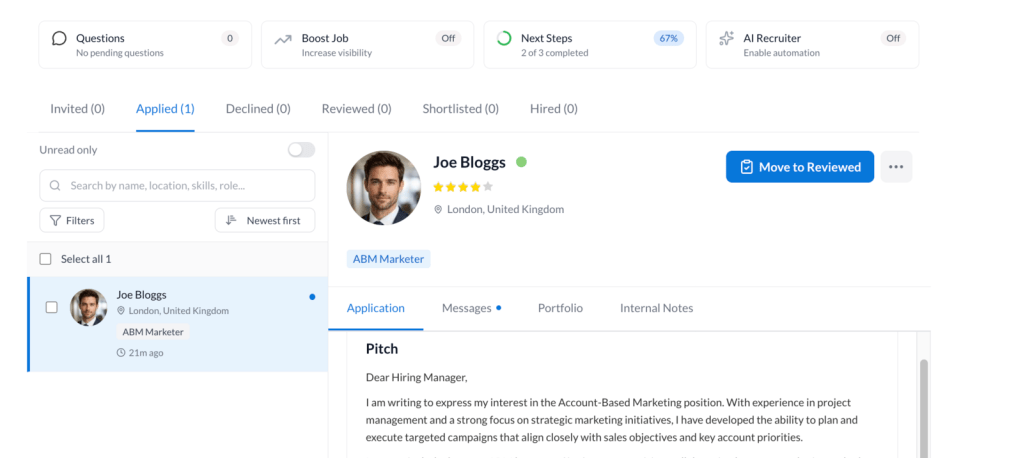
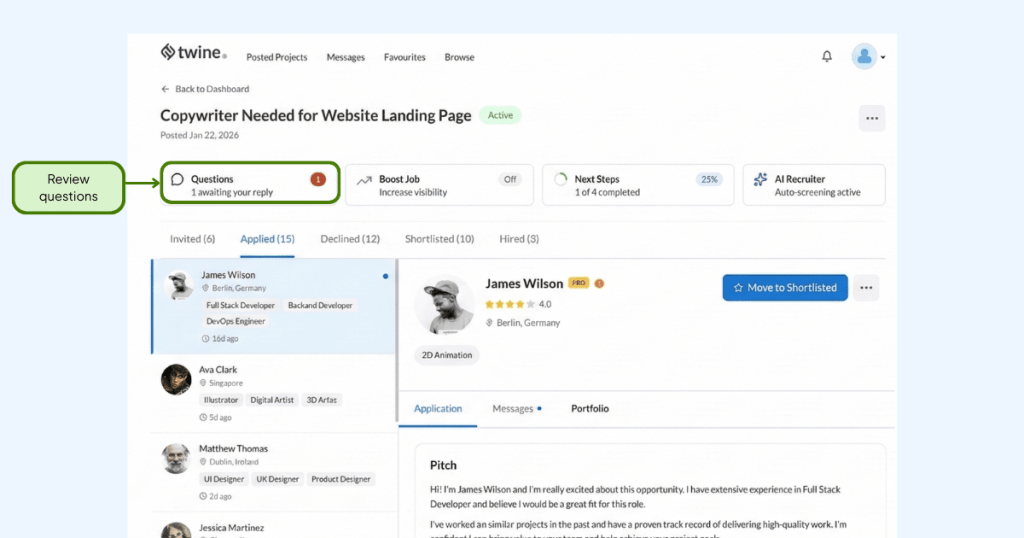
Your Twine project dashboard gives you a clear view of every applicant at every stage. Here’s how the pipeline is structured and how to use it effectively.
Stage | What it means | What to do |
Invited | Freelancers, you’ve reached out to proactively. | Browse portfolios and invite standouts. |
Applied | Vetted pitches from freelancers who applied. Your default view. | Review pitch content and portfolio examples. Move promising candidates forward. |
Reviewed | Candidates at a further evaluation stage. | Use after portfolio review and initial conversations. |
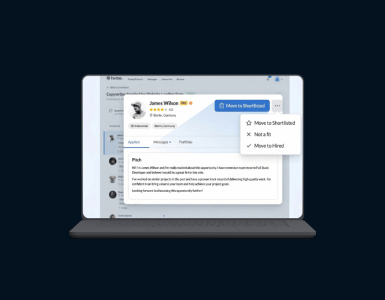
Shortlisted | Candidates you’ve flagged for closer consideration. | Use this as your working shortlist. Compare your top picks side by side. |
Hired | Freelancers you’ve selected for the project. | Move here when you’re ready to engage. Keeps a clear record. |
Declined | Applicants, you’re not moving forward with. | Decline promptly. It’s courteous and keeps your dashboard clean. |
Understanding Pitches
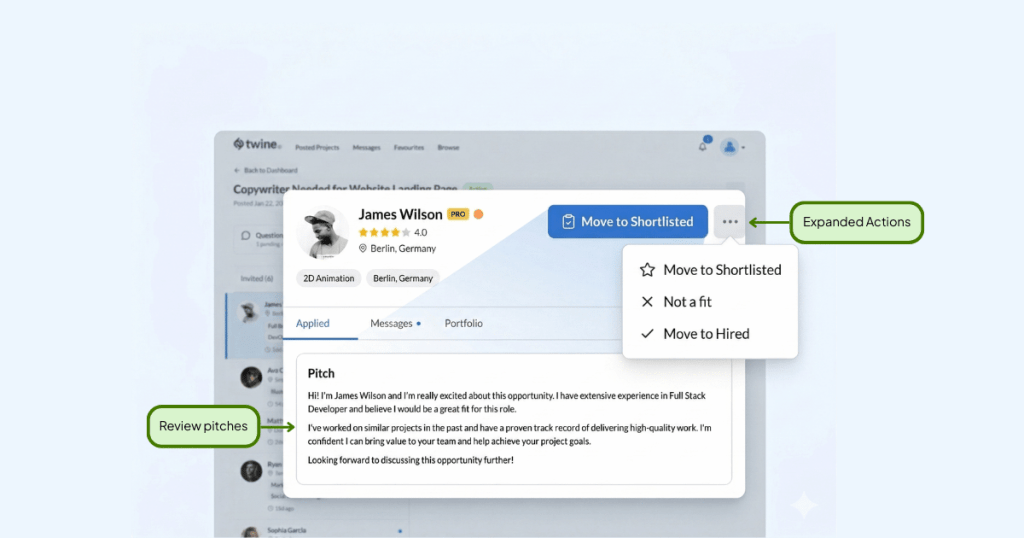
Not every freelancer who wants to pitch will appear in your Applied view. Twine vets pitches before they reach you; freelancers need to include relevant portfolio examples and a substantive message. This gatekeeping prevents noise and means every pitch you review has already passed a quality bar.
When reviewing pitches, look beyond the message itself. Click through to their portfolio. Does their previous work match the aesthetic or technical requirements you outlined? Have they done similar projects before? A short, confident message paired with a relevant portfolio often beats a lengthy pitch with generic examples.
Public Questions from Freelancers
Freelancers can submit clarifying questions about your brief. These are moderated by Twine, sent to you anonymously and once answered, published alongside your job listing so all freelancers can see the response.
Treat public questions as a free brief audit. If the same question comes up more than once, it’s a signal your brief is missing something. Updating your description proactively (in response to the question) will improve pitch quality going forward.
Common question categories: style references, technical constraints, revision policies, and whether you’re open to part-time or ongoing engagement.
Job Expiry and Active Status
Job posts become inactive after 30 days, at which point new freelancers can no longer pitch. This doesn’t affect existing applications or your ability to hire from the current pool.
To keep your post performing:
- Extend the close date via the Manage Jobs tab if you’re still looking.
- Refresh the brief if the spec has evolved or you’ve received useful feedback.
- Re-open a closed post if your hire fell through or you need additional freelancers.
Increase your project visibility
If you want to attract more relevant pitches, you can use Boost Post from your dashboard to give your project extra visibility within the Twine community. This can be useful if you need more applications, want to reach freelancers faster, or are hiring for a niche brief.
Ready to Find Your Next Hire?
Posting a job as a client on Twine streamlines: in a few minutes, you can go from “we should hire someone” to having vetted freelancers pitching directly to your project.
To recap:
- Use a specific, outcome-focused title that tells freelancers exactly what they’d be doing.
- Write a structured description covering overview, deliverables, audience, style, tech, and collaboration.
- Define the scope clearly. State what’s in and what’s out.
- Set a realistic budget range and timeline with specific milestones.
- Configure the location correctly; this affects matching and who gets notified.
- Use public questions to refine your brief and manage your pipeline actively.
When you’re ready:
💼 Post your job on Twine today, connect with the world’s top freelance experts, vetted, matched and ready to work.


 Vicky
Vicky