
 Wave
WaveYou get good at finding the work. The pitch, the portfolio, the client conversation — those have a feedback loop. You send a proposal, you hear back, you iterate. Nobody builds you a system for the part that comes after the yes.
The invoice goes out. Then the waiting starts. And unlike finding the work, the wait doesn’t feel like something you can do anything about. Most freelancers treat it as fixed — a cost of working for yourself, like a slow month or a late cheque from a client in a different time zone.
It isn’t fixed. It’s a set of decisions embedded in your invoice, and most of them can be changed before the next one goes out. That’s what this piece covers — the mechanics of how long it actually takes to get paid, and the five settings that decide it. Twine helps you find the client. Wave handles what happens after.
How long does it take to get paid as a freelancer?
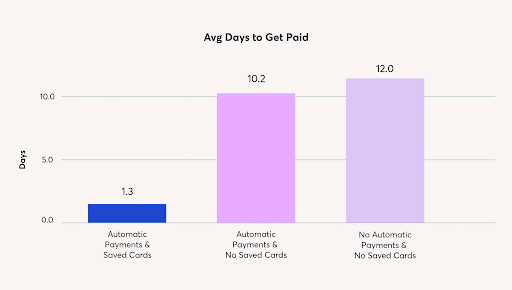
Wave looked at over 2.6 million invoices sent through its platform in the 12 months to November 2023. The wait time didn’t distribute evenly — it split into three distinct tiers based on how the invoice was set up:
- No automatic payments, no saved payment details: Wave users in this group are more likely to get paid in 12 days, on average.
- Automatic payments turned on, no saved payment details: more likely to get paid in around 10.2 days.
- Automatic payments turned on, plus the customer’s payment details saved in Wave: more likely to get paid in around 1.3 days.
Read those three tiers in sequence and the mechanism becomes clear. Automatic payments alone move 12 days to 10.2 — a modest improvement. Add saved payment details and the number drops to 1.3. The automation isn’t doing the heavy lifting. The saved details are. That distinction is the sharpest argument in this article, and it’s where the five audit items at the end are aimed.
Why clients take so long to pay

None of this is about how fast money moves once someone decides to send it. Bank rails haven’t gotten dramatically faster for most transactions. What changed is what happens in the gap before the decision gets made.
The invoice became the place the payment happens. It used to be a notification — a document that told a client money was owed, which they then had to act on somewhere else entirely. Log into a banking portal. Write a cheque. Forward it to accounts payable. Each of those steps was a place the process could stall, hand off, or simply sit in a queue. An online invoice with a payment button collapses all of it into a single action, taken in the same place the request arrived.
Authorization got separated from action. This is the mechanic behind the 1.3-day result observed in Wave’s analysis of recurring invoices. A client who has already agreed to be charged — whose payment method is on file and whose authorization is already in place — doesn’t have to do anything when the next invoice arrives. Nothing to review, approve, or remember. Nothing waiting on their attention. Compare that to a client who has to consciously choose to send money each billing cycle. One is a system. The other is a request sitting in an inbox competing with everything else.
Follow-up stopped being a task you perform manually. Historically, getting paid on time meant remembering to chase, and chasing meant risking the relationship. That’s a real cost — one reason so many freelancers leave late invoices longer than they should. Scheduled reminders shift that dynamic without requiring a judgment call each time.
The through-line across all three: every day of a twelve-day wait is a day the payment sits in a queue, waiting on a person to complete a small task they’d prefer to defer. Remove the decision moment — the step where someone has to choose to act — and the wait compresses. More invoicing effort on your end doesn’t remove that moment. Fewer steps on theirs does.
Why invoicing faster doesn’t fix it
The standard advice is to invoice promptly and chase harder. Both are reasonable habits. Neither removes a single step from the process.
Being disciplined about a twelve-step process isn’t the same as running a two-step one. If a client still has to log into their bank, locate your invoice, and initiate a transfer manually, sending that invoice an hour earlier doesn’t change how many decisions stand between the work and the payment. The friction isn’t on your end of the transaction. It’s on theirs. The fix isn’t more effort from you. It’s fewer steps for them.
That’s what the five settings below actually address.
5 invoice settings that decide when you get paid
Run through this before the next invoice goes out, regardless of which invoicing tool you use. The first three change today, with no conversation required. The last two involve the client, but only once.
Which payment methods should you accept?
An invoice with a pay button ends in one click. An invoice with bank details at the bottom asks the client to leave their inbox, open their banking app or portal, find the reference details, and initiate a transfer themselves. Once it leaves their inbox, it enters a queue — and that queue is where the twelve days live.
The trade-off to weigh: every payment method has an acceptance cost, and every payment method you don’t offer has a waiting cost. Most freelancers have never compared those two numbers directly. The calculation looks different at different day rates — but it’s worth running once, against your own figures, rather than defaulting to whichever option requires no setup.
In Wave, online payments are enabled directly on the invoice, so clients pay from the same page the invoice arrived on. (Wave online payments — available in supported regions.)
When should you send a payment reminder?
Almost every invoicing setup sends a reminder after an invoice goes overdue. That’s chasing, not preventing.
The reminder that actually reduces late payment goes out before the due date — while it still reads as a courtesy, and while the client can still act inside their own payment run. A workable cadence: three days before the due date, on the due date, then seven days after if the invoice is still unpaid. Set this once; it runs on every invoice without further input.
In Wave, scheduled payment reminders handle the timing and sending.
Net 30, or a due date?
“Net 30” is ambiguous. Thirty days from the date you sent the invoice, from the date the client received it, or from the date accounts payable logged it? Every party in that chain tends to resolve the ambiguity in their own favour.
A specific calendar date can’t be reinterpreted. “Due November 14” means November 14. Put the date on the invoice directly, with the payment term in smaller text below it if the contract requires it. The change takes thirty seconds and involves no client conversation.
Wave’s payment terms settings set a fixed due date from the moment the invoice is created.
Who should the invoice actually go to?
With any client above roughly ten employees, the person who commissioned the work is usually not the person who processes payments. An invoice sent only to your contact gets forwarded whenever they get to it — which may not be immediately, and may not include everything accounts payable needs to process it.
An invoice missing a purchase order number or a payment reference gets returned for correction, and the clock starts again from zero.
Ask for the accounts payable email address and any required reference number before the first invoice goes out — not after the first one comes back. This is the most common invisible cause of a slow payment, and it’s fixed with a single email sent once per client.
Wave’s freelancer invoice template includes fields for additional recipients and reference numbers.
Should repeat clients keep payment details on file?
This is the mechanic behind 1.3 days. Saved payment details, paired with Recurring Invoices and Wave Payments, remove the client’s decision moment entirely. Nothing sits waiting for approval because nothing requires it. The invoice arrives; the payment processes.
Set this up at the start of a retainer — when the relationship is new, goodwill is highest, and the request reads as a practical admin step rather than a demand. Mid-engagement, the same ask can feel loaded in ways it doesn’t need to.
For retainer or repeat clients sourced through Twine, this is the setting worth putting in place before the second invoice, not after the third one sits unpaid.
In Wave, recurring invoices with automatic payments handle the authorization and scheduling.
What to do when a client still won’t pay
Everything above assumes a client who intends to pay but hasn’t completed the mechanics of it. None of it applies to a client who has decided not to pay. Those are different problems.
Research published by the UK Department for Business and Trade in September 2024 found that 44% of micro businesses don’t formally pursue late payment because they don’t want to damage the client relationship. Only 19% pursue it formally at all. That dynamic is particularly acute for solo freelancers with no legal or finance function behind them. It’s a real situation that warrants its own reading — not a checklist item at the bottom of an invoicing guide.
The five settings in this article reduce friction for clients who intend to pay. They won’t move a client who doesn’t. Knowing which situation you’re in is the first step in deciding what to do next.
Two halves, one job
Winning the work and collecting on it are two separate disciplines. Most freelancers build real skill in the first. The second tends to stay improvised — managed invoice by invoice, reminder by reminder, with no system underneath it.
The settings above don’t require a new tool, a new workflow, or a conversation with every client. Three of them change today. The other two happen once per client relationship.
Twine covers the first half. For the invoicing and payment side, Wave’s free invoicing handles the rest — including recurring billing and scheduled reminders that produce the 1.3-day result.
Frequently asked questions
How long does it typically take to get paid as a freelancer?
Based on Wave’s analysis of over 2.6 million invoices from the 12 months to November 2023, freelancers without automatic payments or saved payment details are more likely to get paid in around 12 days on average. Enabling automatic payments moves that to around 10.2 days. Adding saved customer payment details moves it to around 1.3 days.
Why do saved payment details matter more than automatic payments?
Automatic payments remove the need for a client to manually initiate a transfer, but the client still has to enter their payment information each time — or at least the first time — if details aren’t saved. Saved details remove that step entirely. The client authorizes once; subsequent invoices process without any action on their part.
Do these invoicing settings work outside the US and Canada?
The Wave invoicing settings covered here — due dates, scheduled reminders, additional recipients, and recurring billing — are available regardless of location. Wave’s online payment processing is currently available in supported regions. If you’re outside those regions, the invoicing settings still apply; the payment method options available to you will differ.
What if a client refuses to pay?
Optimized invoice settings reduce friction for clients who intend to pay. They don’t resolve a situation where a client has decided not to. UK government research indicates that 44% of micro businesses don’t formally pursue late payment to avoid damaging the relationship. That’s a separate problem from slow payment, and it calls for a different response — starting with understanding what formal options exist.
Do I need to use Wave to apply these five settings?
No. The principles here — accepting online payments, sending pre-due reminders, using fixed calendar due dates, invoicing the right recipient with the right reference, and setting up saved payment authorization for repeat clients — apply on any invoicing platform. Wave is one option built to support all five.
Disclaimer: This post is intended for informational purposes only and should not be considered financial, legal, or tax advice. To know what specific tax deductions your small business qualifies for, we recommend that you consult a certified tax professional.


 Vicky
Vicky
 Twine
Twine
 Raksha