RJ van Beek
Freelancers, we’ve all been there. It’s 4:47 p.m., the logo files are still open, along with a calendar tab, a half-finished contract, two client email threads, and the invoice you meant to send at lunch.
The design work is nearly done, but there is still two hours of business housekeeping waiting for you. And it’s mostly because Janice requested separate brand files and invoices because she can’t split the files herself. Thanks Janice.
That’s “administrative fatigue”, and it describes the drag caused by all the work required to run a freelance business that never appears as a line item on an invoice. Scheduling calls. Chasing assets. Copying contact details. Setting up folders. Writing the same welcome email again.
This is not an indictment that you’re bad at time management. But rather, it’s a problem that grows with running a business. And if you are feeling it, you are not alone.
In the US, The Bureau of Labor Statistics notes that self-employed designers may work evenings or weekends and spend part of their time looking for projects or competing for contracts.
The pressure is showing. In a June 2026 survey of 882 creative professionals, 69% said they had experienced burnout during the previous 12 months.
So how do you make it stop?
Well, unfortunately, there is no net-zero here. Admin is a part of doing business. But, there are a number of tested strategies that can help you crush your admin work and perhaps laugh while doing it. So, brew that coffee or tea, and get ready to taste victory. Because, if “40 hours worked, but only 25 billed” resembles your week, here are four areas where you can mitigate admin fatigue.
1. Admin uses hours you could sell
Let’s start with a pretty stock-standard use case we can all relate to.
A new client sends their company details by email. You know there is a better way, but hey, at least they sent it and it tell yourself “it won’t take long.” So you copy them into a proposal, then a contract, then an invoice, then a project board. But guess what? The project has not started, however the same information has already passed through four places. And you had to repeat each one.
None of those steps is difficult. But that’s how they multiply. You keep thinking you’ll “just do one more quickly”, then another appears.
So how do you track this?
The quickest way to see the leak is to calculate billable utilisation:
Billable utilisation = billable hours ÷ total working hours × 100
Work 50 hours and invoice 25, and your utilisation is 50%. That means you losing 50% of your time, and that’s likely because of extra admin.
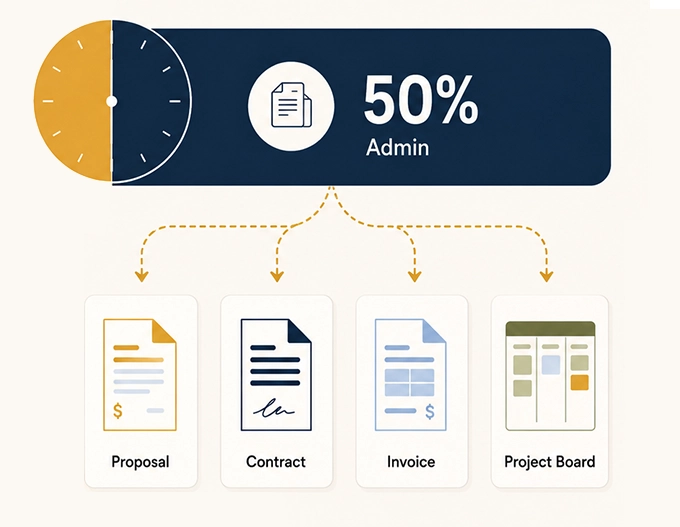
Realize though that you should not aim for 100%. Thats unrealistic because marketing, bookkeeping, professional development and even rest all need room. The useful question to ask is:
How much of the remaining time supports the business and how much exists because you are managing your admin manually?
You might notice that your actual design work might fit into two days. But the contract, scheduling, and asset chase quietly claim the rest of your week, leaving you feeling the Admin fatigue as your head hits the pillow 1am on Friday night.
2. Attention Residue: A two-minute interruption rarely costs two minutes
Imagine this: you are refining layouts and concepts for a brand’s key visuals. It’s work you love. But that takes complete focus and the combined use of your creative and strategic abilities. And rightfully so.
But, in the middle of being in flow-state, a client, (let’s say Janice) urgently asks for available meeting times. You stop to check the calendar, consider your week, and then you reply to Janice. Then you notice another client email, download an important attachment, and review it. When you are done, you return to the artboard.
”Ok, where was I?”
The reply took two minutes. Getting your head back into the design takes way longer.
Thanks again, Janice.
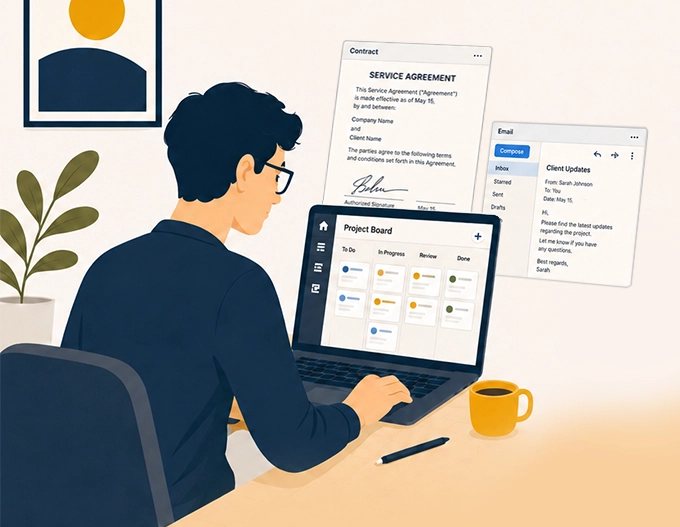
Research on task switching gives this effect a name: attention residue. In two experiments, researcher Sophie Leroy found that people had difficulty moving their attention away from unfinished work, and their performance on the next task suffered.
That matters for designers because the work depends on context. A layout choice might be balancing hierarchy, brand rules, accessibility, copy length and the client’s feedback from last Thursday. Interrupt that process often enough and you’ll need to start again.
Batching admin into one or two blocks can help. Removing the interruption altogether is better. A booking link removes the six-message calendar negotiation email chain with Janice. Create a form connected to your calendar for people to book a time without needing your input. An automatic reminder means you don’t have to keep “chase brand assets” in your head all afternoon.
3. Your quoted rate can flatter you
Let’s do a little math. As a creative, math is not my favorite, so I totally understand your eyeroll. But I promise you this math is helpful.
Suppose you charge $100 an hour and bill 25 hours. Your weekly revenue is $2,500. However, you actually worked 50 hours. So your gross effective hourly rate is actually $2,500 ÷ 50 = $50
Now allocate $250 for software, payment fees, insurance and other business costs tied to that week. Your net effective hourly rate before tax is ($2,500 − $250) ÷ 50 = $45
Your rate card says $100. Your week paid $45 an hour before tax.
This example is simple, but the equation works. And the same calculation works for fixed-fee projects. Divide the fee by every hour the job required, including discovery calls, proposal writing, onboarding, meetings, revisions, invoicing and the final round of “one tiny change”.
The gap between gross revenue and take-home pay is not small change. A February 2026 NBER working paper found that self-employed workers spent an additional five to eight percentage points of gross pay on unreimbursed expenses, on average, compared with traditional employees. The study also found lower hourly earnings across several definitions of freelance work, alongside greater control over when, where and how people worked.
So to combat this gap, you can start by tracking three figures each month:
- Billable utilisation: The percentage of your total working time that you can actually charge to clients. The equation: billable hours ÷ all working hours
- Gross effective rate: The amount you earn per hour when your total revenue is divided by every hour you worked, including unpaid admin. The equation: revenue ÷ all working hours
- Net effective rate before tax: The amount you keep per hour after subtracting business expenses, but before accounting for income tax. The equation: (revenue − business expenses) ÷ all working hours
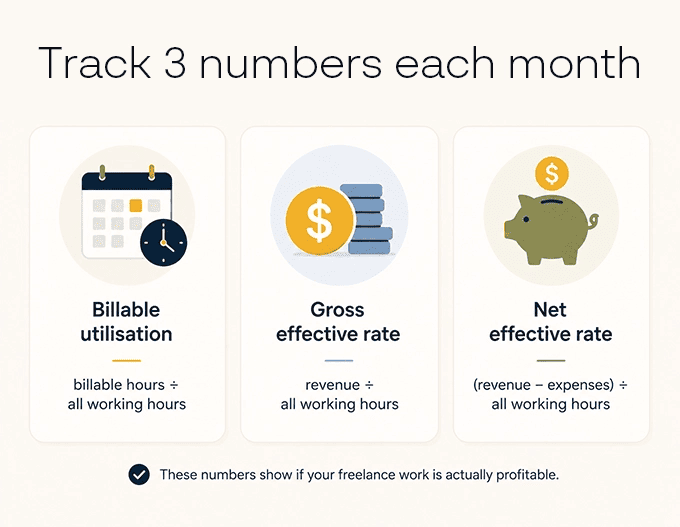
Tracking all three shows whether your freelance business is genuinely profitable, not just busy, and helps you spot when unpaid admin or rising costs are quietly eating into your income.
4. Manual onboarding puts a ceiling on capacity
Take on a second client and the added admin arrives too: another brief, contract, kickoff call, folder structure, invoice schedule, asset chase and status thread.
When every step is handmade, the admin grows with the client list, forcing you to work later, get bogged down in communication, or turn away projects that would otherwise fit.
Yes, AI use has become routine and can help you save time with client tasks like creating contracts and writing emails to Janice. However, it is not moving the needle as much as you might think. In Creative Boom’s 2026 survey, 86% of respondents said they used AI tools, yet only 10% thought AI’s overall effect on the industry was positive.
For freelancers, automation for admin is still key. It’s also the least glamorous work: moving information, preparing standard documents and sending reminders. We avoid doing it and building workflows for it.
How to audit your week for automation opportunities
Taking time to audit your admin work just might unlock your capacity for creative work and adding new clients.
Do the following for one ordinary week, not the unusually quiet week you wish you had.
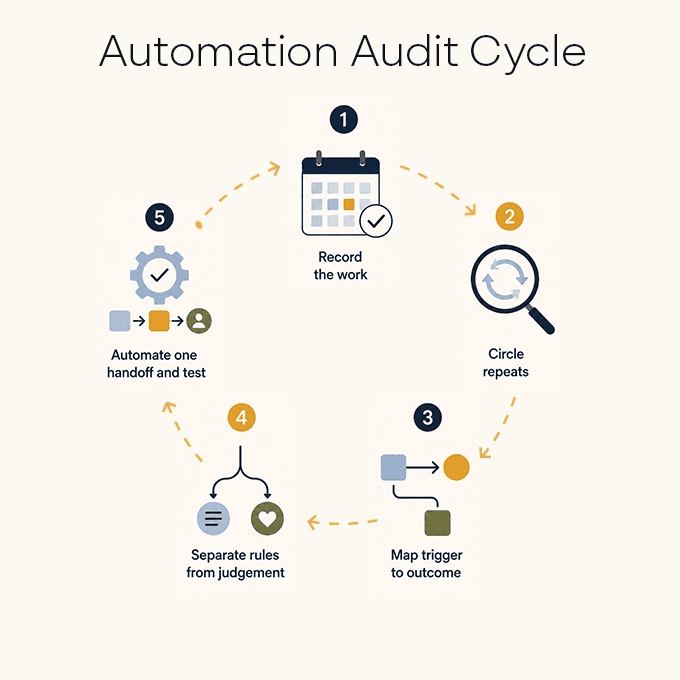
1. Record the work as it happens
Track your day in 30-minute blocks. Include the short tasks. “Sent contract,” “renamed client files” and “found the latest logo” are exactly the types of entries you need.
Reconstructing the week from memory on Friday afternoon will miss most of them.
2. Circle anything you repeated
Look for actions you performed more than once:
- Asking clients for the same information
- Creating the same folders and folder structures
- Sending the same instructions
- Copying answers into another app
- Following up when a deadline passes
The repetition matters more than the size of the task. Five minutes repeated across every lead and client eventually becomes part of your job description.
3. Write down the trigger and the finished state
For example:
Trigger: The client accepts the proposal.
Information needed: Name, email, package, price and start date.
Finished state: Contract ready, welcome email sent and project card created.
This gives you something tangible to work with and build into a workflows And that is much easier to inspect than a vague note saying “automate onboarding”.
4. Separate rules from judgement
A task is a strong automation candidate when it happens regularly, follows the same rule, uses information you already have and is easy to review.
Keep a person involved when the work changes the price, alters legal terms, handles a complaint or calls for creative judgement.
For contracts, use a lawyer-approved contract template and review the exceptions.
5. Automate one handoff and test it
Start with the smallest useful sequence. Run real submissions through it. Check the result, note any failures and fix the awkward bits before adding another step.
Note that a five-app workflow that needs weekly repairs has not saved you from admin. It has recruited you as its caretaker. You are not an integration. Tools like Zapier or Stepper can help with these automations.
What an invisible workflow looks like
Say a potential client finds you through Twine and opens your project enquiry form. The client sees one clear, branded form. They share their contact details, choose a service, upload reference files and answer the questions you need for a useful first conversation.
If you have your workflow set up right, the answers from that one form can fill a lawyer-approved template using contract tools like Papersign, then form builders like Paperform can also send the welcome note and pass the project details into the tool you use to manage the work.
That is an invisible workflow. The experience feels simple because the moving parts stay out of the client’s way. And you stop typing the same company info into three apps.
This is where you want tools that are both powerful and brandable. Apps like Paperform fit this bill: it handles the client-facing form and can pass the submission into the rest of your setup. Twine currently features Paperform in its recommended business admin toolkit, describing it as a way to capture leads, onboard customers and automate everyday workflows without code.
You still decide which projects to accept, what to charge and whether a contract needs a closer look. The routine setup simply stops demanding your attention every time.
Pull up last week’s calendar. Find the admin task you completed three times—or the one that made you sigh loudest. Build that handoff once, test it, and put the saved hour back into the work your clients are actually paying you to do.
Protect the Time You’re Actually Paid For
Freelance admin will never disappear completely, but it should not be the reason your best work gets pushed into evenings and weekends. Once you can see where the time is going, you can start removing the repetitive parts and protect more of your week for paid, creative work.
Just make sure you start small. Find one task you repeat every week, build a simpler handoff, and measure the time you get back. Shoot for sustainability. A better freelance business is not always about finding more clients. Sometimes it is about keeping more of the value from the work you already have.


 Raksha